Free PDF portfolio hosting

A photography portfolio on a calm, dark stage.

Keep your sequencing and edit exactly as you intended. Portfolia shows your PDF full-width on black, so images read at their best.

Drop your PDF hereor click to choose · publish up to 30 MB
Large PDF? Upload options
Before uploading

Everything happens on your device and your original file is never changed. Free publishes PDFs up to 30 MB, Personal up to 100 MB, and you can preview files up to 150 MB first.

  • No sign-up to preview
  • One link, QR code or embed
  • Looks great on phones
Explore the photography example
Live example

Keep your sequencing and edit exactly as you intended. Portfolia shows your PDF full-width on black, so images read at their best.

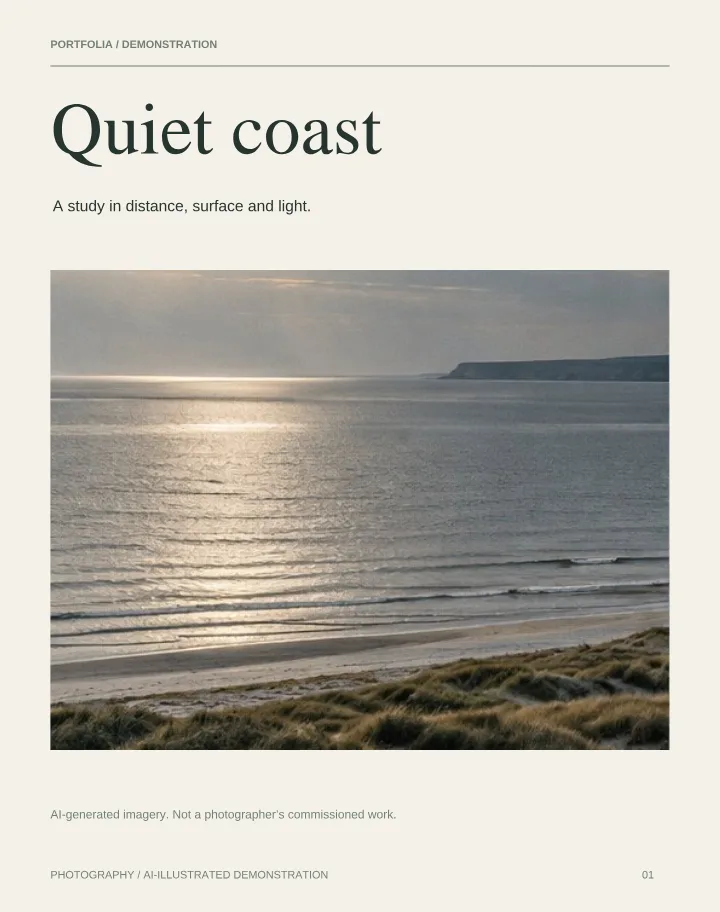
Quiet coast — photography demonstration portfolio cover

Demonstration portfolio

Quiet coast

A six-page demonstration of photographic sequencing: an opening view, a close detail and a quieter closing frame.

  • Six pages: an opening view, a close detail and a quieter closing frame
  • Named projects you can jump between from the Projects menu
  • Simple and Studio views of the same book

Fictional demonstration with AI-generated coastal imagery. Not a real shoot, customer portfolio or photographer’s commissioned work.

Your edit, your sequence

Pages appear in the order you designed — no automatic cropping or reshuffled grids.

Zoom for detail

Visitors can zoom in on pages to see fine detail.

Choose if it downloads

Downloading your PDF is optional and entirely under your control.

Let the sequence communicate your point of view

A photography portfolio is also an edit. Think about the relationship between the opening frame, the images that develop the series and the final impression. Changes in distance, light or scale can help the sequence breathe. Add captions where a location, commission or context matters, and distinguish personal work from commissioned work. The sample here illustrates pacing with generated imagery; your own portfolio should represent your photographs and the authorship you can claim.

Balance detail with a manageable file

Export a screen-ready PDF and inspect it at a realistic viewing size before uploading. Over-compressing photographs can lose texture and create visible artefacts, while oversized source images can slow the first visit. Free publishes one PDF up to 30 MB; Personal up to 100 MB per portfolio. Use the local PDF checker to review size and page structure. Portfolia displays your uploaded PDF and cannot restore resolution or tonal information that was discarded during export.

Give each series its own point of entry

Name your projects by series or subject, such as interiors, portraiture or landscape. Each project can open from its own link, making it easier to direct an editor or client to relevant work. Keep contact information and commissioning details in your profile. You choose whether the PDF download button is available. Password and expiry settings on Personal can control access to a private viewing link, but they cannot prevent a viewer from capturing or retaining material they have already seen.

Before you share

  • Choose a deliberate opening and closing image.
  • Use accurate captions and authorship credits.
  • Check image quality against the upload limit.
  • Make contact and commissioning details easy to find.

Check your PDF locally before uploading, or explore our website embedding guide.

A simple viewer for a professional presentation

Choose how people read. On phones, the book camera follows the current page.

A Simple view and a 3D Studio view with paper finishes, room lighting and backdrops.

Start free with one PDF up to 30 MB. Explore the free PDF flipbook or see the plans.

How it works

How it works

  1. 1

    Export your photo series or book as a PDF.

  2. 2

    Upload it and add your details and contact links.

  3. 3

    Share one link or QR code with editors and clients.

Try it with your PDF

Questions

Can I keep different photographic series in one portfolio?
Yes. Give each series a named page range and share its direct project link. Visitors can still browse the rest of the PDF.
Does disabling downloads stop images being copied?
No. It removes the PDF download control, but it cannot prevent screenshots or other copies of material a visitor can view.
How large can my PDF be?
Up to 30 MB on Free, or up to 100 MB per portfolio on Personal. You can preview larger files first, and the upload box can make a smaller web copy.
Can I share it with a QR code?
Yes. Every published portfolio has a downloadable high-resolution QR code for print, cards and displays.
Will my images be compressed?
Your PDF is shown as uploaded; quality depends on how you export it.